
Download Watzie – AI‑Powered Health Companion for Secure, Easy Health Data Management
Overview – Why Watzie Stands Out in the Health‑Tech Landscape
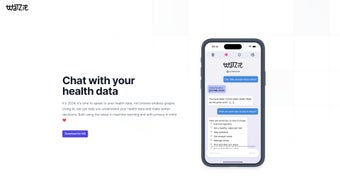
In a world where health data is exploding across wearables, electronic medical records, and nutrition apps, most users feel overwhelmed by charts, spreadsheets, and jargon‑laden reports. Watzie changes the conversation by turning complex health metrics into a natural, chat‑driven experience. Powered by cutting‑edge machine learning, this web‑based application interprets lab results, activity logs, and personal health goals, then delivers clear, actionable insights through a friendly conversational interface. Rather than scrolling through endless graphs, users simply type or speak questions like “How did my blood pressure change over the last month?” or “What diet adjustments can improve my cholesterol?” and receive concise, easy‑to‑understand answers.
Watzie’s core promise is three‑fold: accessibility, privacy, and personalization. Because it lives in the browser, there is no need for heavyweight downloads or device‑specific installations – a modern browser on Windows, macOS, Android, or iOS is enough. The platform follows a privacy‑first model: all user data is encrypted in transit and at rest, and the AI engine processes information without storing personally identifiable details beyond the user’s session. This commitment to security makes Watzie a trustworthy companion for anyone looking to gain better insight into their health without sacrificing confidentiality.
Whether you are a fitness enthusiast tracking macro‑nutrient intake, a chronic‑illness patient monitoring vital signs, or a curious individual wanting to understand your genetic test results, Watzie’s conversational design lowers the barrier to health literacy. By delivering personalized recommendations, trend explanations, and proactive alerts, it empowers users to make informed decisions, set realistic goals, and stay motivated throughout their wellness journey.
Key Features – What Makes Watzie a Powerful Health Companion
- Conversational AI Interface: Ask natural‑language questions and receive instant, jargon‑free explanations.
- Multi‑Source Data Integration: Import data from wearables, electronic health records, nutrition apps, and manual entries.
- Intelligent Trend Analysis: AI detects patterns across weeks, months, and years, highlighting improvements or warning signs.
- Personalized Recommendations: Actionable tips on diet, exercise, medication adherence, and lifestyle changes tailored to your unique profile.
- Privacy‑Centric Architecture: End‑to‑end encryption, no third‑party data sharing, and optional local‑only processing.
- Proactive Health Alerts: Real‑time notifications when metrics cross predefined thresholds.
- Cross‑Platform Accessibility: Works on any modern browser – Windows, macOS, Linux, Android, iOS – without additional software.
- Continuous Learning Engine: The AI improves its advice as it learns from your feedback and evolving medical guidelines.
- Exportable Summaries: Generate PDF or CSV health reports for doctors or personal records.
- Secure Cloud Sync (Optional): Keep your data synchronized across devices while maintaining encryption.
The combination of these features creates a seamless health‑management ecosystem. Users no longer need to toggle between separate dashboards for steps, heart rate, sleep, and lab results. Watzie’s AI aggregates all inputs, contextualizes them, and presents a unified narrative that is both informative and motivating. The proactive alerts act like a virtual nurse, reminding you to take medication, schedule a follow‑up, or simply drink more water when dehydration trends appear.
Additionally, the platform’s learning loop means that the more you interact, the smarter the assistant becomes. By rating responses or providing corrective feedback, you help the model fine‑tune its language and medical relevance. This collaborative approach ensures that recommendations stay current with the latest clinical guidelines and personal health changes.
Installation, Compatibility, and How to Get Started with Watzie
Watzie is a web‑based application, which means it runs directly in your browser without the need for traditional installation. It supports all major operating systems that can run a modern browser: Windows 10/11, macOS Catalina and later, Linux distributions, Android 8.0 and up, and iOS 13 or newer. For the best experience, we recommend using the latest version of Chrome, Firefox, Safari, or Edge.
Step‑by‑Step Installation & Setup
- Visit the Official Site: Navigate to www.watzie.com. The homepage detects your device and offers a “Start for Free” button.
- Create a Secure Account: Sign up with an email address and a strong password, or use single‑sign‑on via Google or Apple ID. Two‑factor authentication (2FA) is optional but strongly recommended.
- Accept Privacy Settings: Review the transparent privacy policy and toggle the data‑storage preferences (cloud sync vs. local‑only).
- Import Your Health Data: Choose from the “Connect Devices” hub to link wearables (Fitbit, Apple Watch, Garmin), health portals (MyChart, Apple Health), or upload CSV/Excel files manually.
- Configure Personal Goals: Set targets for weight, steps, sleep, blood pressure, or any custom metric. Watzie will use these goals to personalize its alerts.
- Start Conversing: Click the chat bubble at the bottom right, type a question, and watch the AI respond in seconds.
The entire onboarding process typically takes under five minutes, even for users with multiple data sources. Watzie’s UI guides you with tooltips and short video tutorials, ensuring a frictionless experience for both tech‑savvy individuals and newcomers.
Regular Updates and Support
Because Watzie is delivered as a SaaS platform, updates are automatic and require no user action. The development team pushes new AI models, security patches, and feature enhancements weekly. Users receive in‑app notifications about major releases, and a dedicated help center offers articles, community forums, and live chat support (available 24/7 for premium subscribers). For enterprise or healthcare‑provider integrations, Watzie also offers API access and custom compliance documentation (HIPAA, GDPR).
Pros, Cons, FAQ, and Final Verdict – Is Watzie the Right Health Companion for You?
Pros
- Natural‑language AI makes health data easy to understand.
- Works on any device with a modern browser – no heavy downloads.
- Robust privacy controls and end‑to‑end encryption.
- Integrates with a wide range of wearables and health platforms.
- Proactive alerts help prevent potential health issues.
- Continuous learning improves recommendation accuracy over time.
- Free tier available; premium plan adds advanced analytics and priority support.
Cons
- Advanced AI features require an internet connection; offline mode is limited.
- Premium subscription needed for unlimited data imports and API access.
- Initial AI responses may be generic until sufficient user interaction occurs.
Frequently Asked Questions
Is my health data truly private with Watzie?
Yes. Watzie uses TLS 1.3 for data in transit and AES‑256 encryption for data at rest. The AI processes information without storing personally identifiable details beyond the session, and users can opt for local‑only processing, which never leaves the device.
Can I use Watzie on my smartphone without an app?
Absolutely. Watzie is fully responsive and works in mobile browsers on Android and iOS. The chat interface adapts to touch input, and voice recognition is supported on devices with built‑in microphones.
What types of health data can I import?
You can connect wearables (steps, heart rate, sleep), electronic health record portals (lab results, medication lists), nutrition trackers, and manually upload CSV/Excel files for custom metrics.
Is there a free version, and what does it include?
Yes. The free tier allows up to three data source connections, basic conversational queries, and standard privacy protection. Premium upgrades unlock unlimited imports, advanced analytics, and priority support.
How often does Watzie’s AI get updated?
The underlying models are refreshed weekly, with major feature releases approximately every two months. All updates are applied automatically without user intervention.
Conclusion – Take Control of Your Health with Watzie Today
Watzie bridges the gap between complex health data and everyday understanding. Its conversational AI, strong privacy stance, and cross‑platform availability make it an ideal companion for anyone seeking clearer insight into their wellness journey. While an internet connection is required for full functionality and the premium tier unlocks the deepest analytics, the free version already delivers a compelling, user‑friendly experience. If you’re ready to replace confusing charts with simple, actionable conversations, click the link below to start your free account and let Watzie become the trusted health ally you’ve been waiting for.



.png)



